Closed captioning & subtitling software
The professional subtitle editor, made for broadcast
Everything you need to deliver broadcast-quality closed captions, subtitles, and audio descriptions — without the hassle. Desktop, web, and offline, in one subscription.
Free 7-day trial · Cancel anytime
What is Closed Caption Creator?
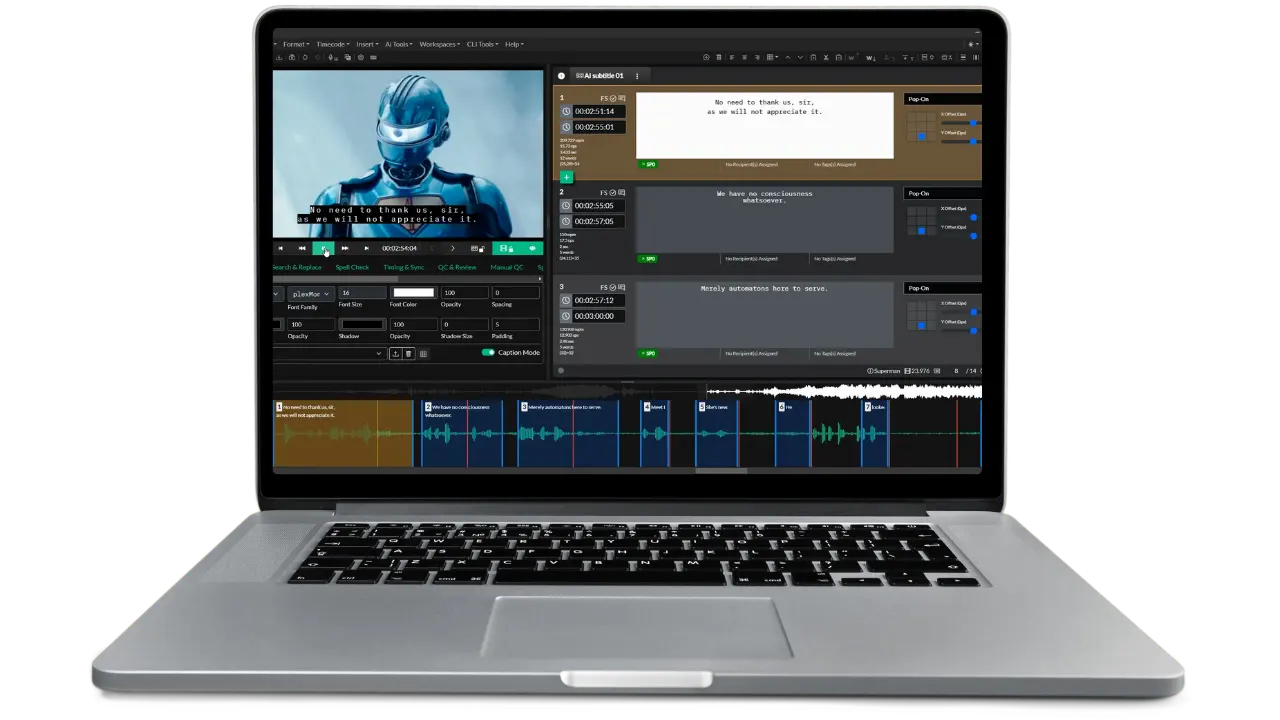
Closed Caption Creator is a professional closed captioning and subtitling application for broadcast and media teams. It combines automatic captioning, QC and review tools, machine translation, and audio description in one editor, and exports more than 30 caption formats — including embedded 608/708 for broadcast delivery.
Trusted by broadcast and media accessibility teams









Create & edit
How do you transcribe and edit captions in less time?
Closed Caption Creator saves time with AI transcription, custom keyboard shortcuts, and batch editing — so manual work goes where it matters.
- Automatic captioning & sync. Generate accurate captions in a few clicks with Deepgram, Speechmatics, and AssemblyAI built in.
- Custom keyboard shortcuts. Set your own shortcuts for manual transcription, spotting, and formatting.
- Batch editing. Select multiple caption events and insert speaker IDs, align text, or update positioning at once.

Automatic transcription with engine selection, language detection, and speaker identification.
QC & review
How do you deliver 100% accurate captions every time?
Configure custom style guides and error detection settings, then let automatic checks find and fix issues before delivery.
- Realtime Error Detection. Alerts appear next to caption events as you work — reading speed, line length, overlap, and more.
- Custom style guides. Turn your technical and content rules into automatic checks and QC reports.
- Tags, notes, and approvals. Communicate QC status across the team with pass/fail approval states.

The QC and Review panel lists every detected issue, linked to the caption event it belongs to.
Export & delivery
Can you deliver captions in every format a client asks for?
Yes. Closed Caption Creator supports over 30 caption and subtitle formats, transcripts, dialogue lists, and broadcast embedding — all from one export screen.
- Sidecar caption files. SRT, VTT, SCC, MCC, STL, TTML, IMSC, and 30+ more.
- Video export with burnt-in subtitles. Render open captions in any style for social and review copies.
- Embedded 608/708 captioning. Embed into MP4, MXF, MOV, and more without re-encoding the video. Avid AAF exports supported.Requires Pro or Enterprise. Additional costs apply.

Every delivery option — sidecar files, embedded captions, transcripts, and video — in one screen.
We keep innovating so you can keep delivering accessible media

The editing workspace: video preview, event list, positioning controls, and waveform timeline.
Monthly updates
New features and fixes ship every month, including delivery profiles as platforms adopt them.
Support & training
Book 1:1 virtual training for teams, and reach technical support by email and live chat 24/7.
Integrations
Connect Closed Caption Creator with your existing OMS or MAM system and automate the busywork.
Professional services
Closed Caption Creator can be customized to meet your specific workflow requirements.
One editor for the whole captioning workflow
From first transcript to final delivery, every step lives in the same application.
Looking for something specific? Explore every feature side by side.
Purpose-built workflows, not just an editor
Customer story
Fast turnarounds. Broadcast-quality results.
YesTV is a commercial television station committed to positive, family-friendly programming. Their media accessibility team uses Closed Caption Creator to deliver closed captioning and audio descriptions for content produced both in-house and from external providers.
Closed Caption Creator has transformed our closed captioning process, reducing turnaround times significantly. Its automated transcription, editing tools, and customization options have improved efficiency, ensuring high-quality captions for broadcast in record time. A game-changer for content producers and broadcasters.
Security you can trust
Closed Caption Creator is SOC 2 Type II compliant
Our SOC 2 Type II compliance demonstrates our ongoing commitment to protecting customer data through independently reviewed controls for security, availability, and confidentiality.
Frequently asked questions
Everything teams ask before starting a trial.
Closed Caption Creator offers both a desktop and a web application. Install it on macOS, Windows, or Linux for seamless access, or run it directly in your web browser — one subscription covers all of them.
Yes! Closed Caption Creator is compatible with Google's Chrome browser.
Yes, we offer an offline version that can be installed on any desktop and does not require an internet connection.
Closed Caption Creator supports over 30 different closed caption and subtitle formats. A complete list of supported formats can be found here.
No! Closed Caption Creator empowers you to edit existing caption files and transcripts, or take full control by transcribing manually.
Choose the plan that fits your needs: our Starter plan offers 300 minutes per month, while our Pro plan provides 600 minutes per month. Additional minutes can be added at just $0.10 per minute.
No. Closed Caption Creator is built for file-based post-production captioning and does not support live captioning at this time.
Yes! You can easily update the position and style of your subtitles and closed captioning using the position controls and style panel.
You can easily add and remove team members by logging into Closed Caption Creator and going to Help -> Manage Team.
You can manage your subscription by visiting our customer portal. See our refund policy for the 14-day money-back guarantee.
Ready to start captioning your videos?
Sign up for a free 7-day trial and get access to our video courses and user guide. New to the app? Read the Getting Started guide.