Solution Use Case
Embed EIA-608/708 Closed Captioning
Package & deliver broadcast-ready video files using the Closed Caption Embed Export option
Export Video With Embedded Captioning
The CC Embed option allows users to embed 608 and 708 closed captioning with support for multiple file formats including MXF, MP4, MPEG, MOV, and more.
Closed Caption Creator is a professional timed-text editor used to create closed captioning and subtitles for broadcast.
Many broadcast television stations require that closed captioning be embedded in the video file for delivery and playout. This approach has many benefits, such as the fact that it only requires storing and managing a single file. Additionally, it ensures that the closed caption data remains with the video.
However, there are also drawbacks, such as the amount of time it takes to embed the closed captioning and the limited number of tools available to perform this task.
We are excited to announce the release of our new Closed Caption Embed function, which allows users to embed EIA-608 and EIA-708 closed captioning using Closed Caption Creator.
- Embed 608/708 Closed Captioning
- File support includes MP4, MXF, GXF, MOV, and more.
- Re-wrap (passthrough) without needing to transcode
- Available for Windows, Mac, and Linux
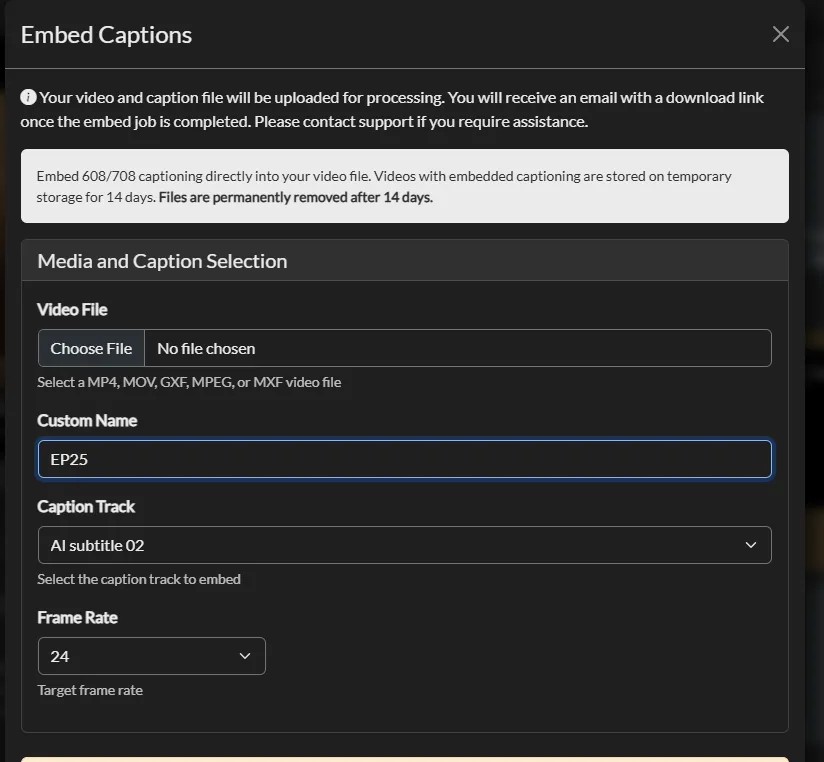
How do I embed 608/708 closed captions into a video file without re-encoding?
Closed Caption Creator's CC Embed option embeds EIA-608 and EIA-708 captions using re-wrap (passthrough), so the video is not transcoded. Supported containers include MP4, MXF, GXF, MOV, and MPEG, and embedding takes about as long as copying a file between directories.
How It Works
From caption project to broadcast-ready file
Embed 608/708 captioning without re-encoding — embedding takes about as long as copying a file between directories.
STEP 1
Author
Create or import your closed captioning in the professional timed-text editor.
STEP 2
Embed
Export with CC Embed using re-wrap (passthrough) — no transcode, no lost quality.
STEP 3
Review
Extract embedded captions back into an Event Group to edit and review at any time.
STEP 4
Deliver
Ship a single broadcast-ready file with 608 and 708 caption data that stays with the video.
- $2.00 + $0.40/GBFlat per-file embed pricing
- No transcodeRe-wrap passthrough — as fast as copying a file
- Win · Mac · LinuxEmbedding runs on almost any system
Embed Closed Captioning
Embed closed captioning without re-encoding
The CC Embed Exporter supports re-wrap (or passthrough) of broadcast video. This saves a considerable amount of time and processing power when embedding captions. The time required to embed closed captioning is similar to copying a file from one directory to another.
With support for Mac, Windows, and Linux, the embedding process can take place on almost any system that has access to both the video and closed caption project.
The result is a broadcast-ready file with both 608 and 708 closed captioning.
Extract Closed Captioning
Edit and review embedded closed captioning
Closed Caption Creator can extract embedded captions from a broadcast video file and import them as an Event Group in an existing project. This allows broadcast teams to edit and review embedded captions.
Any changes made to the closed captioning can then be re-embedded in the original file without the need to re-encode.
Sidecar caption files vs. embedded closed captions
Many broadcast stations require captions embedded in the video file for delivery and playout. Here's why.
| Sidecar Caption File | Embedded 608/708 Captions | |
|---|---|---|
| File management | Video plus a separate caption file to track | A single file to store and manage |
| Caption data stays with the video | No — files can be separated or lost | Yes — caption data remains inside the video file |
| Broadcast delivery & playout | Not accepted by many broadcast stations | Required by many stations for delivery and playout |
| Editing later | Edit the sidecar file directly | Extract to an Event Group, edit, and re-embed without re-encoding |
Ready to get started?
Sign up for a free 7-day trial of Closed Caption Creator and receive access to our video tutorials and courses.
Create closed captioning, subtitles, transcripts, and audio descriptions all in one application. Closed Caption Creator is made for broadcast and captioning teams who are committed to delivering high-quality, accessible video. Sign up now, or contact us for a live demo.
Embedded captioning questions
What broadcast teams ask about embedding and extracting EIA-608/708 captions with the CC Embed export option.
The CC Embed export option supports MP4, MXF, GXF, MOV, MPEG, and more. The result is a single broadcast-ready file containing both 608 and 708 closed captioning, so the caption data stays with the video for broadcast delivery and playout.
No. CC Embed supports re-wrap, or passthrough, of broadcast video, so no transcode is needed. The time required to embed closed captioning is similar to copying a file from one directory to another. Embedding is available on Windows, Mac, and Linux.
Yes. Closed Caption Creator can extract embedded captions from a broadcast video file and import them as an Event Group in an existing project. After the captions are edited and reviewed, the changes can be re-embedded in the original file without re-encoding.
Embedding 608/708 captions is charged at a flat $2.00 per file plus $0.40 per GB uploaded. The embedding capability itself is included with the Pro and Enterprise plans, and Pro is $60 per month or $50 per month billed annually. A 7-day free trial is available.
Many broadcast television stations require closed captioning to be embedded in the video file for delivery and playout. This approach means only a single file needs to be stored and managed, and it ensures the closed caption data remains with the video.
The CC Embed function is available for Windows, Mac, and Linux. Because re-wrap does not require a transcode, embedding can run on almost any system with access to both the video and the closed caption project, producing a broadcast-ready file with 608 and 708 captioning.